

🛠️Safest GFX Tool on Google Play is now compatible with newer game update🛠️
Any battle royal game player can lower the game graphics and use memory boost to play game without any lag. You can even unlock HDR graphics and enjoy the excellent picture quality.
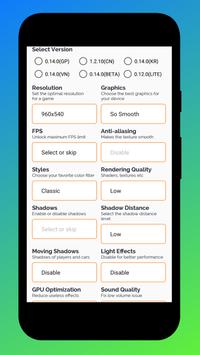
You can customize Resolution, enable HDR graphics, unlock the FPS limit, and tweaks other options like Shadows, textures quality, MSAA, Extra effects with unique features like Best settings, Zero lag Battery efficient mode, Potato graphics, Graphic Profile, GPU Optimization, Hardware-Accelerated Rendering and much more.
Tune your game graphics with our GFX optimizer for lag free gaming experience
Developer of PUB Gfx Tool presenting another most advanced GFX optimizer tool
Features of this app:
👉Auto Gaming Mode:Automatically configures all the settings of Game Turbo & Game Tuner according to your device specifications.
👉Game Turbo: Includes CPU & GPU Boost, RAM & SD Card Booster, System Performance Tuner
👉Game Tuner: Includes features of our PUB GFX Tool like Zero Lag Mode, Potato Graphics and all other settings.
👉Ping Booster with Speed Test*PRO: For Optimize your ping by speeding it up.
👉Best settings*PRO : Now you can apply the graphics settings of high end devices (like Pixel 3/S10/OnePlus 7 pro/Poco/Note 9/Razer/Xperia XZ3/Moto Z2/OppoF9/Vivo NEX etc) on your device. Simply, Look for your favorite settings and import it.
👉Other Features: Includes Gaming Settings, Quick Boost, Quick Launch, Smart widget and much more.
Best, Original & Safe GFX Tool which is recommended and no lag


![Real 120fps Unlock Best Gfx Tool Lag Fix+120fps bgmi pubg [root/non root] 120 FPS 4.2 UPDATE screenshot 5](https://i.ytimg.com/vi/D72caTMxDoo/mqdefault.jpg)

9Apps 4.9











